


“For once, she had a whole chapter and the afternoon ahead of her.”
Bring that book you keep meaning to finish. Listen with the screen locked and pick up where you left off.
Hear what that sounds like Local TTSStart listening
Turn PDFs, ebooks, photos and notes into natural speech on your phone.
Listen with your screen locked.
Download a voice once. Then listen offline.
For iPhone, iPad & Android · Free preview
Notes for a curious mind

Press play. Follow the words.
Import a file, paste your notes or scan a printed page. Local TTS reads the words aloud on your phone.
Research, reports and long reads. Import a PDF with selectable text and listen to it on your terms.
Try the readerYour next interesting idea could come on the walk home.
Examples shown on iPhone & iPad. Android import options include PDF, DOCX, TXT and photos.
From your first import to your next chapter.
Real iPhone screens with sample documents. Tap a screen to see it in full.

Open Add to library, then Choose file. Select the PDF saved in Files.

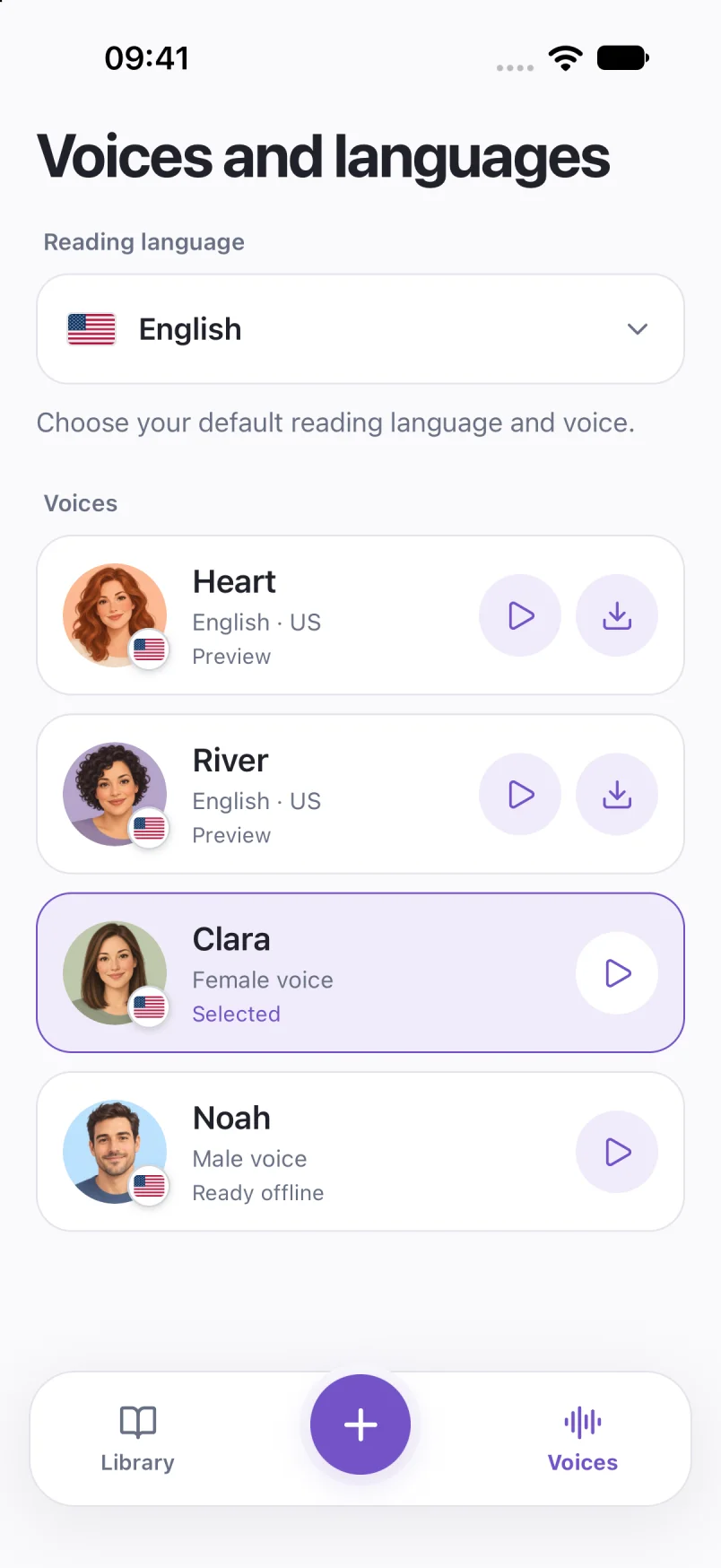
A preview button is not a completed download. In this capture, Noah is marked Ready offline and Clara is selected.

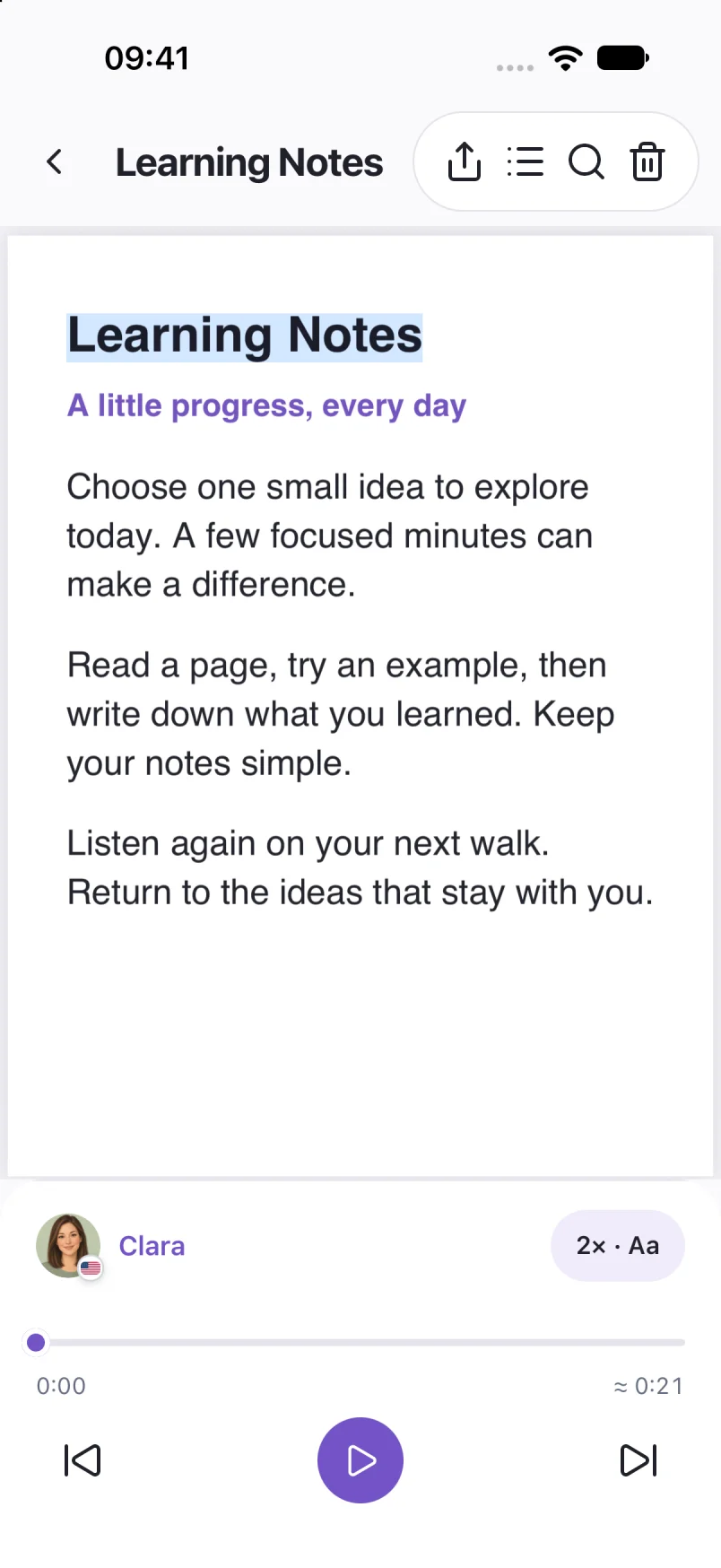
This sample PDF is open in the reader. The voice, speed and play button sit below the page.

The shared reader preferences let you adjust speed and set a sleep timer. This capture uses a sample note; the same controls are available when listening to a book.
Shown on iPhone. Interface, import options and voices can vary by platform and app version.
File formats, offline listening and audio export.
Estimate your listening timeListen to a journal, a work document or a book. Local TTS creates the narration right on your device.
Your phone turns the text into audio.
Download a voice once and keep your files on your device.
Open a document and start listening.
Ready offline
| Local TTS | Cloud speech | |
|---|---|---|
| Where speech is made | On your device | On the provider’s server |
| Where your text is processed | On your device | Sent to the speech provider |
| Making new audio offline | Works with a downloaded voice | Requires a connection |
Some cloud readers can play previously saved audio offline. How cloud synthesis works
Voice downloads and purchases need internet. Usage analytics can be disabled in Settings and excludes document text and audio. On Android, Google services may collect technical diagnostics.
Privacy policyMeet the voices in Local TTS. Tap a portrait, take a listen, and find the one for your next chapter.
English sample
English sample
English sample
English sample
Your books. Your notes. Your language. Hear a sample, then find your voice in the app.
Voice availability varies by language.
Clara · EnglishVoice previewTry six voice samples here. All 31 reading languages below are available in the app.
All 31 languages. Ready to come along.
You don’t need another hour in front of a screen. Just a moment to listen.
“For once, she had a whole chapter and the afternoon ahead of her.”
Bring that book you keep meaning to finish. Listen with the screen locked and pick up where you left off.
Hear what that sounds likeThe connection can wait.
The next chapter doesn’t have to.
“For once, she had a whole chapter
and the afternoon ahead of her.”
Save a voice and your documents before you go. Generate new speech on your device, even without a connection.
Your text isn’t sent to a cloud speech service. You can also export narration as M4A with Pro.
Internet is needed for voice downloads and purchases. Full listening and premium features require an in-app purchase.
Hear your own document before you decide. Upgrade to Pro when you’re ready to keep listening.
Try it with your own words.
The preview is a sample of your document. Full listening and audio export need Pro.
Keep the good reading going.
Choose a monthly or lifetime option in the app. Your local price is shown before purchase.
Start with the free preview.
Choose Pro in the app when you’re ready.

Download a voice before listening offline. Downloads and purchases need internet. Pro is an in-app purchase.
Local TTS is a text-to-speech app for iPhone, iPad and Android. It reads your PDFs, EPUB books, documents, photos and notes aloud, with speech generated on your device after downloading a voice.
Yes. Download Local TTS from Google Play for Android, or from the App Store for iPhone and iPad. The examples on this website show the iPhone app; import options and interface details can vary by platform.
Yes. Download the voice you want and keep your documents on your device. Speech generation then works offline. Downloads and purchases require internet.
You can try a listening preview before upgrading. Full listening and premium features require an in-app purchase. Available plans and prices are shown in the app.
On iPhone and iPad, import DRM-free EPUB, DOCX, ODT, TXT and Markdown files, or PDFs with selectable text. Android import options include PDF, DOCX, TXT and photos. You can also paste text. Review recognized text before listening to photos or scans.
Local TTS supports 31 reading languages, including English, Polish, German, Spanish, French, Japanese and Korean. The complete list and six voice samples are shown above. Voice availability varies by language.
With Pro, you can export narration as an M4A audio file and share it from your phone or tablet. Local TTS does not export MP3.
Practical guides for the reading you already have.
Learn how to read a PDF aloud on iPhone: check selectable text, import your file, choose a voice and listen offline with Local TTS.
PDF listening 5 min readListen to your DRM-free EPUB books on iPhone. Learn how to import a book, choose a voice, keep your place and prepare for offline listening.
Books & EPUB 5 min readSet up offline text to speech on iPhone before a flight or commute. Download a voice, save your documents and check playback without Wi-Fi or cellular data.
Offline listening 5 min readRead text from a photo aloud on iPhone. Choose an image or scan a page, review the recognized words, select a voice and listen with Local TTS.
Photos & scans 5 min readBring a document. Find your voice. Take it with you.


